How to Create Google Adsense Account | Tricks-Collections
How to Create Google Adsense Account Tricks Collections
Today Google Adsense is the most popular online money maker for website and blog owner. But many blog owners do not know how to create Adsense account. Actually create an Adsense account is very easy, you just require a website or blog with language content that supported by Google Adsense and the website has indexed by Google (suggestion: the website contain minimal 10 pages to get Adsense accepted).
Some important aspects to success creating Google Adsense account you must have a website with self hosting (now Google not accept free domain such as BlogSpot, multiply, and other free domain) and your website not contain content that violates Adsense content guidelines such as Pornography content, hacking or cracking, Gambling, Illicit drugs and other.
Are you ready to create Google Adsense Account? Please the following steps to create an account:
- Open Adsense website at this link: https://www.google.com/adsense. After the Adsense page opened click “Sign up now” button.

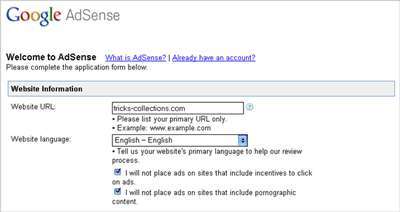
- On the next page you must completed the Adsense registration form. There three form sections must be completed on this page, here:Website information; enter you website URL, website language (Now Adsense support 32 language)